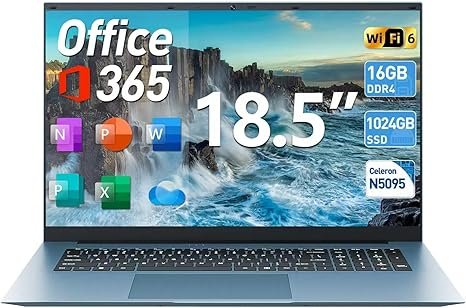

SGIN Windows 11 Laptop Review: 18.5 Inch, 16GB RAM, 1024GB SSD
Estimated reading time: 8 minutes
Key Takeaways
- Large 18.5 inch screen Laptop enhances productivity, especially for spreadsheets and split-screen use.
- 16GB RAM supports smooth multitasking across numerous office apps and browser tabs.
- 1024GB SSD provides fast boot times and ample local storage for files and applications.
- The Celeron N5095 Quad-Core processor balances efficiency and performance for typical office and web tasks.
- WiFi 6 and HDMI output ensure modern connectivity and external display options, see related gaming laptop with WiFi 6.
- The 8000 mAh battery supports extended work sessions, with noise from the cooling fan as a tradeoff.
Table of contents
- Key Takeaways
- Why this laptop matters
- Key points
- Specs table
- Performance notes
- Battery, heat, and mobility
- Ports and expandability
- Security and software
- Who benefits most
- Who should pick another laptop
- Comparison with similar models
- Pros and cons
- Buying tips
- How to set up for best results
- Practical scenarios and expected behavior
- Final takeaways
- Frequently Asked Questions
Why this laptop matters
You want a laptop that gives a large display without a hefty price tag. You want memory that supports multiple browser tabs and documents. You want a large SSD for files. This SGIN model stacks those traits into one package. Below you find clear guidance to match the device to your needs. For guidance on maximizing your Windows 11 setup, including configuring Office 365 for productivity, this MacBook Air 13-inch with 16GB memory blog offers tips applicable across platforms.
Key points
- Screen, 18.5 inch, which improves productivity for spreadsheets and split screens.
- Memory, 16 GB RAM. Smooth multitasking for office apps and light media work.
- Storage, 1024 GB SSD. Fast boot and large local storage for files and apps.
- Processor, Celeron N5095 Quad-Core. Efficient for office tasks and web browsing.
- Connectivity, WiFi 6 and HDMI output. Modern wireless speeds and external display support. For more on WiFi 6 benefits in laptops, see this related gaming laptop with WiFi 6 review.
- Battery, 8000 mAh. Useful for full work sessions away from outlets, subject to workload.
Specs table
| Spec | Detail |
|---|---|
| Screen | 18.5 inch, widescreen |
| Processor | Celeron N5095, quad-core, burst 2.9 GHz |
| Memory | 16 GB RAM |
| Storage | 1024 GB SSD |
| Operating System | Windows 11 and Office 365 included |
| Wireless | WiFi 6, Bluetooth |
| Battery | 8000 mAh |
| Ports | HDMI, USB ports, audio jack |
| Cooling | Cooling fan for prolonged tasks |
Performance notes
The N5095 is an energy efficient chip. It performs well with office suites, video calls, web work, and media playback. Expect slower performance with heavy photo or video editing. Heavy multitasking with high CPU loads will slow response. The 16 GB RAM offsets limits by allowing more apps to remain active without swapping to disk. The 1024 GB SSD gives fast load times and large local storage for files and virtual machines. To understand memory advantages in real world use, this detailed laptop review with 16GB RAM is useful.
Real use examples
- Open 20 browser tabs and a Word document. System stays responsive.
- Run Excel with multiple sheets and moderate formulas. Sheets load quickly.
- Stream 1080p video while editing a document. Playback stays smooth.
Battery, heat, and mobility
The 8000 mAh battery supports long sessions away from power. Screen size increases power draw. Expect fewer hours than ultrabook models with smaller displays. The built in fan reduces heat under load. Expect audible fan noise during extended tasks. The size makes travel bulkier than 13 to 15 inch laptops. Use this model when display space matters more than ultra mobility. For a review of a similar sized 17.3 inch Windows 11 laptop with 16GB RAM and optimized battery management see this laptop with 17.3 inch FHD and 16GB RAM.
Ports and expandability
HDMI output allows a second monitor or an external projector. Multiple USB ports support peripherals and external drives. The large SSD reduces need for extra storage. The system lists Windows 11. Office 365 arrives preinstalled, giving immediate access to Word, Excel, and Outlook.
Security and software
Windows 11 provides regular security updates. Office 365 gives cloud backup options for your files. Use strong passwords and enable Windows updates. Consider adding a password manager for secure account storage. For work tasks, enable BitLocker for drive encryption if required by your organization. This aligns well with typical security recommendations found in the MacBook Air security and software setup article.
Who benefits most
- You work with multiple documents at once and want screen space.
- You teach or study from home and prefer a larger display for readings.
- You host frequent video calls and need a stable laptop with a built in cooling fan.
- You store large files locally and want fast SSD access.
Who should pick another laptop
- You travel daily and need a lighter model with longer battery life for flights.
- You edit high resolution video or work with 3D rendering. Choose a machine with a stronger CPU and discrete GPU.
- You need the smallest footprint for tight desks or cafes.
Comparison with similar models
Compare basic traits to weigh trade offs. The list below uses common market benchmarks for clarity.
| Model | Screen | RAM | Storage | Best for |
|---|---|---|---|---|
| SGIN Windows 11 | 18.5 inch | 16 GB | 1024 GB SSD | Large screen office work |
| Typical 14 inch ultrabook | 14 inch | 8 GB | 256 GB SSD | Portability and battery life |
| Entry-level gaming laptop | 15.6 inch | 16 GB | 512 GB SSD | Gaming and GPU tasks |
Pros and cons
| Pros | Cons |
|---|---|
|
|
Buying tips
- Check seller ratings and return policy on Amazon before purchase.
- Measure your workspace to confirm the 18.5 inch fit for your desk.
- Test battery life with your typical workflow if possible.
- If you use heavy editing apps, add a dedicated workstation to your shortlist. For workstation options with more powerful CPUs, see also the ASUS TUF Gaming Laptop review.
- Use the included Office 365 license to set up cloud backups from day one.
How to set up for best results
- Install Windows updates immediately after first boot.
- Enable automatic backups to OneDrive for file safety.
- Adjust power settings for balance between performance and battery life.
- Keep vents clear for effective fan operation during long sessions.
Practical scenarios and expected behavior
For remote work, the screen helps keep multiple apps visible. For online classes, the display improves reading comfort and note taking. For content streaming, 1080p playback remains smooth. For spreadsheet work with large tables, the display reduces the need to scroll. For heavy rendering, expect slowdowns and longer waits.
Final takeaways
If you value screen real estate and local storage, this laptop proves a sensible choice. The memory size removes a common bottleneck for office users. The CPU favors efficiency over raw throughput. Assess your mobility needs before buying. If you travel light, choose a smaller model with extended battery life. If you work mostly at a desk, the SGIN offers a compelling balance of features and price.
Note, verify current price and stock on the Amazon product page prior to purchase. Product specs listed above reflect the seller listing. Use your workflow to test battery life and heat under your load after purchase.
Frequently Asked Questions
- What operating system does the SGIN laptop use?
It runs Windows 11 with Office 365 included for immediate productivity. - How long does the battery last?
The 8000 mAh battery supports several hours of use depending on workload and brightness settings. - Is this laptop good for gaming?
This model targets office and study uses; for gaming, consider models with stronger GPUs like in the ASUS TUF Gaming Laptop review. - Does this laptop support external monitors?
Yes, the HDMI port allows connection to an external display or projector. - How does this laptop handle heat?
It has a built-in cooling fan which helps with extended use but can produce audible noise.
}