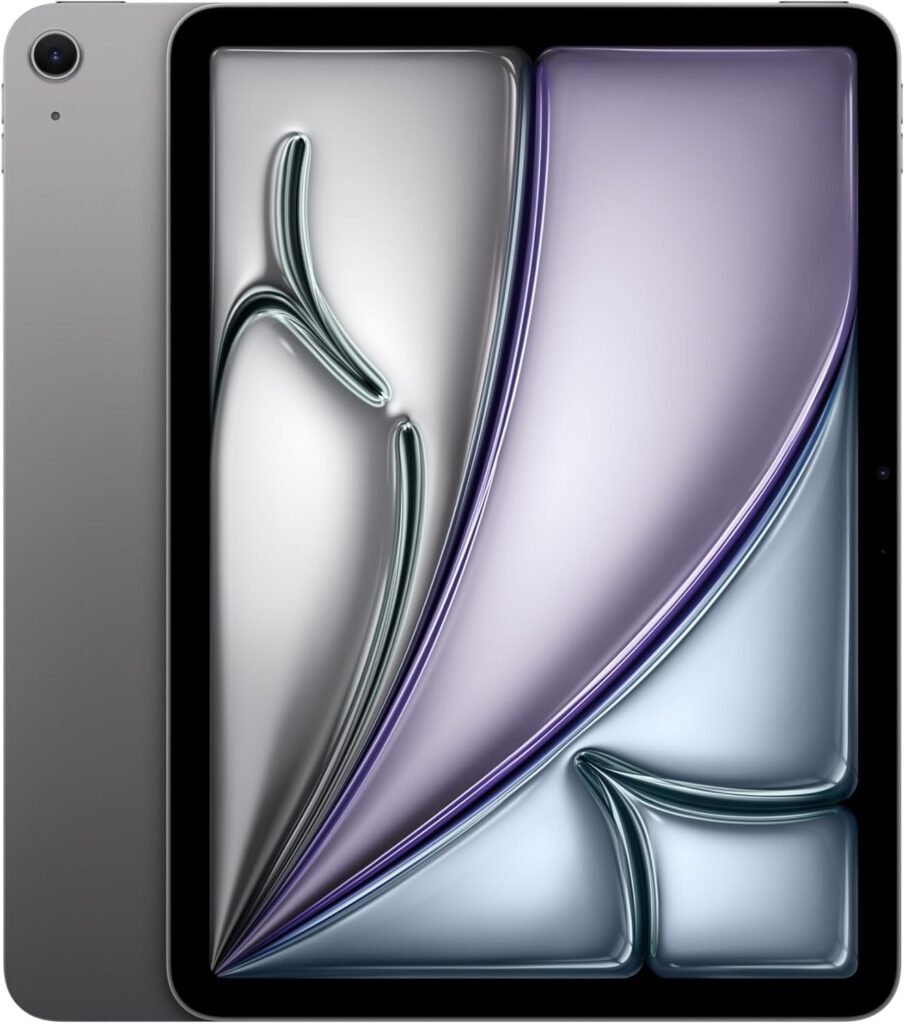

Apple iPad Air 11-inch M3 Review: Fast, Light, 256GB Space Gray

Estimated reading time: 9 minutes
Key Takeaways
- IPAD Blazing performance: Powered by the new M3 chip ensures faster app launches and smooth multitasking.
- Portability meets quality: The 11-inch Liquid Retina tablet is thin, light, and boasts a vibrant display ideal for work and entertainment.
- Connectivity upgrade: Supports Wi-Fi 6E iPad Air standard for speedy and stable networks.
- Ample storage: 256GB capacity fits most media libraries and apps without compromise.
- Security & convenience: Quick Touch ID unlock and payments keep your data safe.
Table of contents
- Quick hook
- What matters most
- Top 3 reasons this iPad matters
- Detailed look
- Specs table
- Who should buy
- Who should wait
- Comparison snapshot
- Practical tests and real use notes
- Accessories worth pairing
- Tips before you buy
- Price and value
- Short verdict
- Actionable final steps
- Frequently Asked Questions
Quick hook
Want a laptop class processor inside a tablet? The Apple iPad Air 11-inch with M3 brings speed, a sharp display, and a balanced feature set. It keeps weight low. It extends battery life for full workdays. If you use apps for productivity, creative work, or media, this model deserves a close look.
What matters most
- Performance: M3 chip for faster apps and smoother multitask. For comparison with previous models, see our Apple iPad 11-inch A16 review.
- Portability: 11-inch Liquid Retina, thin, light for travel.
- Storage: 256GB model suited for moderate media libraries and apps.
- Connectivity: Wi-Fi 6E, fast wireless in dense networks. For more on Wi-Fi standards, see Wi-Fi 6E on iPad Air M3.
- Security: Touch ID for quick unlock and payments.
Top 3 reasons this iPad matters
- Speed that keeps pace with heavy apps. Use pro apps without stalls. Check multitask and export benchmarks versus the previous iPad 11-inch A16.
- True portability. You move between meetings, flights, couches with one device.
- Balanced value. Premium chip, strong display, mid-tier price compared to Pro line.
Detailed look
Design
The body stays slim. The bezel remains minimal. The 11-inch footprint fits a backpack sleeve. The Space Gray finish looks professional. Buttons sit where you expect. The USB-C port supports fast charging and accessories. MagSafe support is absent for this model. The unit feels solid in hand.
Display
The Liquid Retina panel produces crisp text and vivid color. Pixel density suits pro apps and streaming. Brightness handles indoor use with ease. Colors look accurate for photo editing of social posts. The screen lacks ProMotion adaptive refresh, which matters for frame-heavy workflows. Still, the experience stays smooth for most tasks. For features comparisons with other Apple tablets, see the Apple iPad Air 11-inch M3 detailed specs.
Performance and M3
The M3 chip brings more CPU and GPU headroom than prior Air chips. You will run multiple apps and browser tabs with little slowdown. Video export speeds improve for short edits. Graphics in games feel sharper. The neural engine helps image and audio tasks. Developers optimize apps for the chip, which improves launch times and runtime responsiveness.
Cameras
Rear camera runs at 12MP. It handles document scans and casual photos well. The center-stage 12MP front camera keeps you framed during video calls. Expect clear calls and reliable autofocus during meetings.
Battery
Apple lists all-day battery life. Real use depends on screen brightness and load. Light browsing and email will reach a full day. Heavy video editing shortens runtime. Fast charging with suitable adapter reduces downtime. See real-world battery tests in our iPad 11-inch A16 review for baseline battery performance.
Connectivity
Wi-Fi 6E improves throughput in crowded networks. Bluetooth supports accessories. Cellular is an option for mobile plans in cellular models. Pairing Apple Pencil and keyboards remains seamless.
Specs table
| Feature | Apple iPad Air 11-inch (M3) – 256GB |
|---|---|
| Processor | M3 |
| Display | 11-inch Liquid Retina |
| Storage | 256GB |
| Cameras | 12MP front, 12MP back |
| Wireless | Wi-Fi 6E, Bluetooth |
| Security | Touch ID |
| Battery | All-day use, fast charging support |
| Color | Space Gray |
Who should buy
- Mobile professionals, who need speed in a light device.
- Students, who handle notes, media, and research tasks.
- Creators, who edit photos and short videos on the go.
- Casual users, who stream, browse, and video chat.
Who should wait
- Need ProMotion for high frame design or detailed animation. Compare with the iPad Pro 11-inch review.
- Require larger screens for intensive multitask.
- Prefer a lower price and smaller storage footprint.
Comparison snapshot
Use this quick comparison to decide between the Air M3 and other Apple tablets.
| Model | Best for | Key edge |
|---|---|---|
| iPad Air 11-inch M3 | Balanced power and portability | Newer chip, light design |
| iPad Pro 11-inch | Pro workflows and highest brightness | ProMotion, higher sustained performance |
| iPad (standard) | Budget basic use | Lower price, older chips |
Practical tests and real use notes
- Multitask: Run five to eight browser tabs plus a notes app. Performance stays smooth for most tasks.
- Video export: Short edits finish faster than older Air models.
- Streaming: High bitrate streams render without stutter.
- Battery: One full workday with mixed use when brightness stays moderate.
Accessories worth pairing
- Apple Pencil Pro or second generation for note taking and drawing. For tips on pairing and usage, see Apple Pencil and Keyboard Guide.
- External keyboard for typing and email.
- USB-C hub for drives and wired displays.
Tips before you buy
- Choose 256GB if you store large photo or video libraries.
- Pick the cellular model for remote work away from Wi-Fi.
- Buy a quality case to protect the thin edges and screen.
- Check bundles that include Apple Pencil or keyboard for savings.
Price and value
The 256GB Air strikes a balance. Price sits below Pro models while offering a modern chip and strong screen. For most users, the trade between features and cost favors the Air. If you need the fastest sustained GPU or ProMotion, move to the Pro line.
Short verdict
The iPad Air 11-inch with M3 offers speed, portability, and modern wireless features in a compact package. For users who want a serious tablet without the Pro price tag, this model fits. You will get fast app launches, reliable multitask, and a bright screen for media.
Actionable final steps
- Decide how much storage you need based on your media usage.
- Compare keyboard and pencil bundles for cost savings.
- Check current deals below before you buy.
Note on updates, Apple updates firmware and software regularly. Check current specs on the product page before purchase.
Ready to move forward? Choose storage and accessories, then complete checkout.
Frequently Asked Questions
- Is the Apple iPad Air 11-inch M3 good for professional creative work?
- Yes, the M3 chip delivers fast performance suitable for photo editing, video editing, and multitasking on professional apps.
- Does the iPad Air 11-inch M3 support Apple Pencil?
- Yes, it supports the Apple Pencil (2nd generation). For pairing and usage tips, check out the Apple Pencil and Keyboard Guide.
- What are the battery life expectations?
- Apple lists all-day battery life. Real usage depends on workload and brightness. Light use can last a full day, while heavy video editing shortens battery.
- Is this iPad model suitable for gaming?
- Yes, the enhanced GPU in the M3 chip offers sharper graphics and smoother gameplay compared to previous Air models.
- Does it support cellular connectivity?
- Cellular models are available, offering options for mobile plans and connectivity on the go.
}