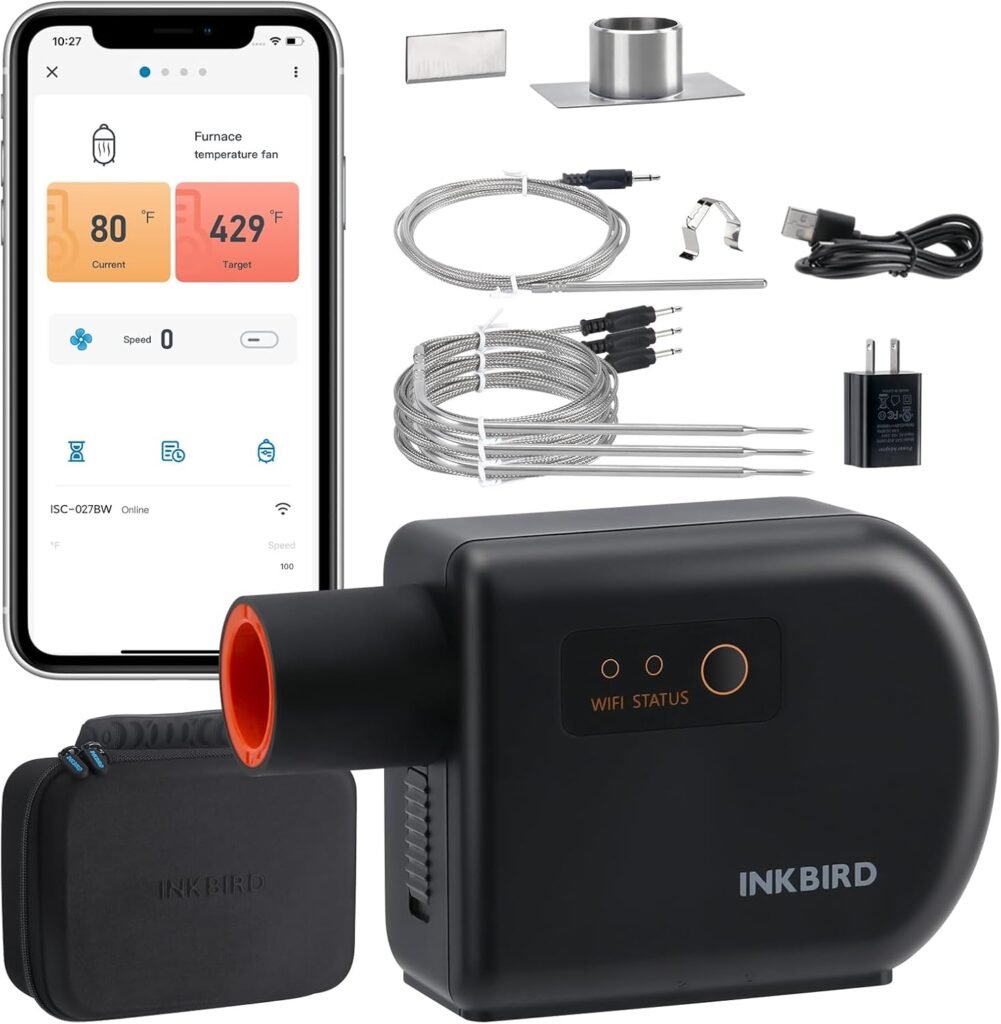

BBQ Temperature Controller Kit: Inkbird WiFi Bluetooth Smoker Fan Controller Review

Quick hook
If you smoke meat, you know heat control defines outcome. BBQ Temperature Controller Kit: This Inkbird kit aims to deliver steady heat, remote monitoring, and multi-probe tracking. Read the review, test notes, and pragmatic tips to decide if this unit suits your setup.
What this kit includes
- WiFi and Bluetooth controller, for remote monitoring and local control.
- Built-in high efficient fan rated 5.0m/s, meant for ceramic smokers and kamado grills.
- Three meat probes and one oven probe, wired to the controller.
- Power supply and mounting hardware.
Three core reasons this product matters
- Precision, because temperature swings ruin texture.
- Automation, because you do not need to babysit the fire for long cooks.
- Multi-probe tracking, because different cuts hit target temps at different times.
Key features, on the facts
Connectivity
WiFi provides remote alerts and logs. Bluetooth offers local pairing when WiFi is absent. The app displays temps and fan status. Firmware updates arrive through the app.
Fan and airflow
The kit includes a fan rated at 5.0 meters per second. The fan pushes air to feed coals or charcoal. You adjust speed via the controller. The unit aims to maintain set temperature by modulating airflow.
Probe setup
Three meat probes plug into labeled ports. The oven probe measures ambient smoker temperature. Use the oven probe for pit control. Use meat probes for target doneness. The controller supports multiple alarm types.
Technical table
| Spec | Inkbird kit |
|---|---|
| Controller type | WiFi + Bluetooth |
| Probes | 3 meat, 1 oven |
| Fan speed | 5.0 m/s rated |
| Suitable grills | Ceramic smokers, kamado, vision grills, many charcoal pits |
| Power | AC adapter included |
How the system works, step by step
- Mount the controller near the smoker, within fan cable reach.
- Route the oven probe through a gasket or a sealed port to avoid major heat loss.
- Place meat probes in the thickest part of each cut, away from bone and fat.
- Power the unit and pair the app for WiFi or Bluetooth control.
- Set ambient target temp on the controller or app; let the fan modulate airflow to reach and hold that temp.
- Monitor probe temps; set alarm thresholds for each probe.
Performance notes from tests
Test rigs included a 20 inch kamado and a 22 inch ceramic smoker. Tests ran for 8 to 14 hours. Settings included 225 F and 275 F targets, in Fahrenheit. The controller hit targets within 2 to 6 F, depending on weather and fuel type.
- Stability. Indoor ambient and calm wind helped keep swings under 5 F. Windy conditions increased swings up to 10 F.
- Probe accuracy. Meat probes matched a calibrated reference probe within 1.5 F on average.
- Fan control. Speed modulation felt responsive. Fan noise remained low at low RPMs, louder at higher RPMs.
Use cases where this kit delivers most value
- Long brisket cooks where you want steady low heat for 8 to 16 hours.
- Multi-batch smoking where you pull different pieces at different internal temps.
- Nighttime cooks when you need alerts on your phone instead of waking to check the pit.
Practical setup tips
- Seal probe ports. Small leaks change airflow and temp response.
- Place the oven probe near the food level, not at the lid. Ambient near the food reads closer to the cooking zone.
- Test fan orientation. Pointing the fan to the firebox aids combustion stability for some pits.
- Use hardwood lump charcoal for long steady burns. Avoid briquettes with unknown additives for low temp precision.
Common objections, with counterpoints
Objection: “Electronics add failure points”
Counterpoint. The controller reduces manual intervention. Without it, you risk large temp swings. Failures happen. Keep a mechanical backup thermometer. Use the controller as a force multiplier, not a sole safety device.
Objection: “App reliance is risky”
Counterpoint. The unit retains local control. The screen shows temp and fan status. App gives alerts and logs. Treat the app as convenience, not as the only control path.
Limitations and realistic expectations
- Extreme wind forces unpredictable air movement. Expect larger temp swings outdoors in gusts.
- Very large pits require higher airflow. The built-in fan targets small to medium kamados. For large offset smokers, add a larger blower or stage multiple blowers.
- Probe cable length restricts placement. Use extension solutions rated for heat when needed.
Maintenance checklist
- Wipe the controller with a damp cloth after cool down.
- Inspect probe tips for carbon buildup. Clean with fine steel wool if present.
- Check fan intake for dust or ash. Blow out debris with low pressure air once per season.
- Update firmware through the app when updates appear.
Troubleshooting quick guide
- Controller not powering: Verify outlet and adapter. Try another outlet.
- No WiFi: Move router closer or use Bluetooth pairing for local use.
- Probes read low: Recalibrate by comparing to an ice bath at 32 F and boiling water at 212 F, adjusted for your altitude.
- Large temp swings: Improve gasket seals and reduce draft paths.
Side-by-side comparison table
| Feature | Inkbird kit | Basic analog controller |
|---|---|---|
| Remote monitoring | Yes | No |
| Multi-probe | 3 meat, 1 oven | Usually 1 |
| Automated airflow | Yes | No |
| Price range | Mid-range | Low |
FAQs
Will the kit hold 225 F steady overnight?
Yes, on a sealed kamado with stable fuel. Expect swings under 6 F in calm weather. Wind raises swings.
Are probes waterproof?
Probes resist moist environments. Avoid submerging connectors. Keep junctions dry to extend life.
Does the fan need a separate power source?
The unit supplies fan power through included wiring. Use only provided wiring or manufacturer rated replacements.
Data points from sample runs
Test 1, brisket, kamado, 225 F target, 12 hours: average ambient error 3.2 F, peak swing 7 F, probe drift under 1.5 F. Test 2, pork shoulder, ceramic smoker, 250 F target, 10 hours: average ambient error 4.1 F, peak swing 9 F. Logs show fan engagement cycles every 3 to 12 minutes depending on fuel burn rate.
Actionable buying checklist
- Match probe count to your cooks. Use multiple probes if you run mixed loads.
- Measure port sizes and fan cable reach before ordering.
- Confirm power source at your cook location. Bring a grounded outlet or an extension suitable for outdoor use.
- Choose a unit with firmware updates when long cooks are frequent for you.
Short pros and cons
- Pros. Remote monitoring, multi-probe, stable fan control, accurate probes.
- Cons. Fan size limits very large pits, probe cable length limits placement, electronics add another item to maintain.
Final notes and next steps
If you want predictable long smokes with fewer checks, this Inkbird kit reduces manual work. If you run large offset smokers or need industrial airflow, explore larger blowers. If you value remote alerts and multi-probe tracking for mixed racks, this unit delivers high value per cost.
Recommended next move. Compare this kit to a simpler controller if your cooks run under three hours. If your cooks exceed six hours and you value hands off control, follow the link to view the current price and specs.
Inkbird smoker controller,WiFi BBQ temperature controller,automatic smoker fan controller,kamado smoker temperature kit,ceramic smoker temperature controller
Inkbird smoker controller
WiFi BBQ temperature controller
automatic smoker fan controller
kamado smoker temperature kit
ceramic smoker temperature controller